DriverPack Solution
DriverPack Solution quick and auto-updating of drivers
Safe & Secure

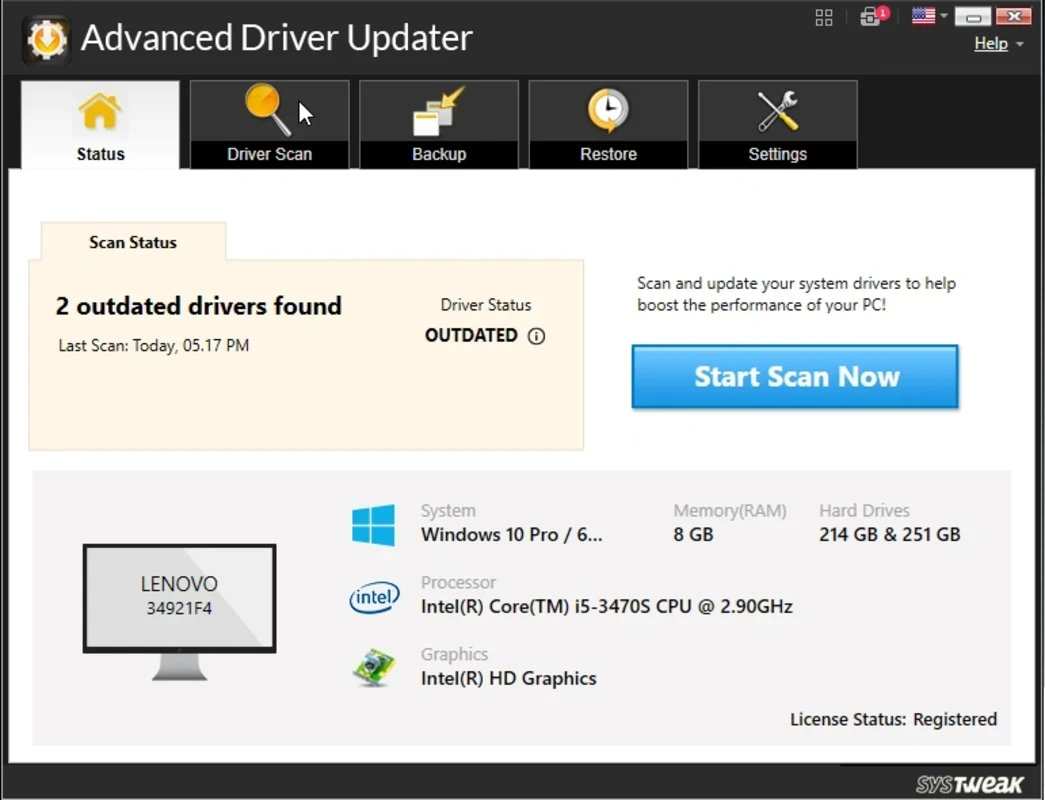

Advanced Driver Updater is a powerful Windows software, allowing users to update their system to the latest version and fix issues caused by outdated drivers. It offers free, fast, and hassle-free automatic downloading of the latest updates, proving the best solution for the Microsoft Windows operating system to keep it updated.
The app offers a simple interface with backup capability, enabling users to go back to a previous version if they are not satisfied with the new one. Drivers are innovative software used for communicating with your system, and if you have outdated drivers, it can affect the performance of your system badly.
Advanced Driver Updater, developed by Systweak Inc., falls under the System Utilities category and is a free trial software. It helps to run the computer faster by locating the latest drivers on the internet and installing them on your system automatically within a few clicks.
The innovative app makes the system smooth and efficient, replacing missing or incompatible drivers while avoiding having to look for the latest drivers on the system manufacturer’s website. You can get the best of your computer with updated drivers and easily access new features as well.
The app offers a quick scanning process for the entire system, detecting missing or outdated drivers. It is necessary, especially when you find your system is performing slowly and doesn’t respond the way you want. So, the app offers the best services to help you locate the reasons for slow performance and scans the system to detect outdated drivers.
The app offers a clean and intuitive interface with all innovative features that are easily navigated. It offers a seamless scanning process to detect slow-performing, missing, or outdated drivers, allowing you to access the features available within your computer hardware. You can also check other details related to drivers, such as name, version, age, status, and so on.
When you scan the system to locate outdated drivers, the app offers a list of all missing and outdated drivers, allowing users to update them, downloading and installing them automatically within a few clicks. However, some new drivers don’t respond as you want, so the app also offers an ‘Exclusion list’, enabling users to exclude such drivers that can cause system instability and incompatibility issues.
It is also a significant feature to enable the users create a full or selective backup of the available drivers on their PC. It makes it possible to revert to the previous drivers and restore them if you need them. In addition, the manual scanning process allows users to install only required drivers and delete them if they don’t respond. You can enable the automatic backup feature from the settings menu.
The app also offers a ‘Schedule scanning’ feature, allowing users to scan and update drivers frequently. The manufacturers offer new drivers along with the release of any new hardware, and most of the drivers are released to fix bugs and other discovered issues as well. So, you can run a one-time update, or simply schedule regular scans and updates.
The app proves the low-consumer of CPU and system memory, working like a breeze and offering good response time with user documentation, as there is not displayed any error dialogs, hangs, or crashes are displayed while processing. The intuitive layout and simplicity make the app simple to use, even for less experienced users.
The app is completely compatible with Windows 11 and all other Windows versions, from old to latest, and recommends the correct driver for the specific operating system. So, the app reliably selects and installs the drivers most suitable for your computer’s configuration. Moreover, support for multiple languages offers quick switching to your desired language, setting the action on the close button, and setting the app to run at system startup automatically.
The app offers services in different scenarios, such as random crashes, poor performance, poor video output, slow web surfing, incorrect video display, and so on. It also includes multiple hardware errors, such as blue screen errors, and other relevant problems with drivers. In case of facing such symptoms, simply install and run the app to fix the issues.
Pros
Cons

DriverPack Solution quick and auto-updating of drivers

DirectX 12 launched by Microsoft very effectively controls the games.
DirectX 11 perform multiple tasks about games, and multimedia programs.
DirectX 10 is increasing the quality of audio and video of ATI and NVIDIA cards.

DirectX 9.0c run and display multimedia apps, audio, 2D, and 3D

3uTools offers jailbreaking and flashing features for your iOS devices.